OCR Calibration
This guide covers how to verify and configure OCR (Optical Character Recognition) for reading cards, stacks, and bets.
Step 1: Enable OCR View
- Make sure detection rectangles are working (see Table Detection)
- In the RTA software, click Show OCR
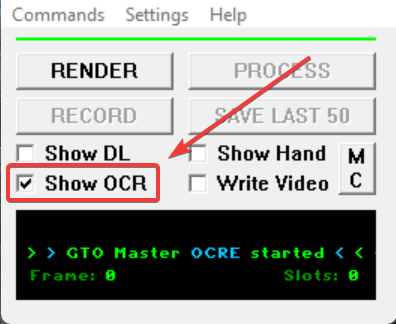
- You should see recognized values overlaid on the tables
Expected Result
Card values, chip stacks, and bet amounts appear as text overlays on your tables.
Step 2: Verify Recognition
Check that the following are being read correctly:
Cards
- Hole cards are recognized
- Community cards are recognized
- Card values match what's displayed on tables
Stacks
- Player stack sizes are recognized
- Values match the actual chip counts
- All player positions are reading
Bets
- Bet amounts are recognized
- Pot size is reading correctly
- Values update when action happens
Step 3: HUD Placement
Your HUD (Heads-Up Display) can interfere with OCR if it covers detection areas.
Check HUD Positions
- Enable Show DL to see detection rectangles
- Look for any HUD elements overlapping the rectangles
- Move HUD stats away from detection areas
Common Problem Areas
- Player name/stack area
- Card positions
- Bet amount displays
- Action buttons
HUD Blocking Detection
If your HUD covers any detection rectangles, the OCR will fail to read those elements. Use Show DL to identify conflicts.
Step 4: Poker Client Settings
Your poker client's visual settings affect OCR accuracy:
Recommended Settings
- Use a simple table theme (avoid fancy/animated themes)
- Use standard card designs (4-color deck is fine)
- Keep the felt color consistent across all tables
- Disable any table animations if possible
Settings to Avoid
- 3D or animated card reveals
- Transparent or semi-transparent elements
- Custom themes with unusual fonts
- Tables with different themes/colors
Common Issues
Cards Not Reading
- Check that card positions aren't covered by HUD
- Verify the poker client is using a supported card style
- Make sure cards are fully visible (not during deal animation)
Stacks Not Reading
- Check for HUD elements covering stack displays
- Verify stack numbers are fully visible
- Some sites show abbreviated stacks (e.g., "1.5k") - check compatibility
Bets Not Reading
- Check for popups or chat covering bet displays
- Verify bet amounts are visible and not animated
- Some sites have unusual bet display formats
Some Tables Work, Others Don't
- All tables must use the same theme/settings
- Check for anything different about non-working tables
- Verify all tables are the same size
Testing Your Setup
To verify everything is working:
- Open a few poker tables (observing is enough)
- Enable both Show DL and Show OCR
- Watch a few hands play out
- Verify cards, stacks, and bets update correctly
No Need to Play
You can test detection by just observing tables - you don't need to sit down and play.
Troubleshooting
If OCR isn't working after following these steps:
- Take a screenshot with Show DL and Show OCR both active
- Note which elements are not reading correctly
- Check our Troubleshooting Wizard
- Contact support with your screenshot and details
Setup Complete!
Once cards, stacks, and bets are all reading correctly, your setup is complete!
If you encounter issues later, use the Troubleshooting Wizard to diagnose problems.